Data Preprocessing
The Data Preprocessing page is used to quickly clean, normalize, and standardize whole-rock major element data before subsequent calculations (such as CIPW, plotting, and geochemical indices).
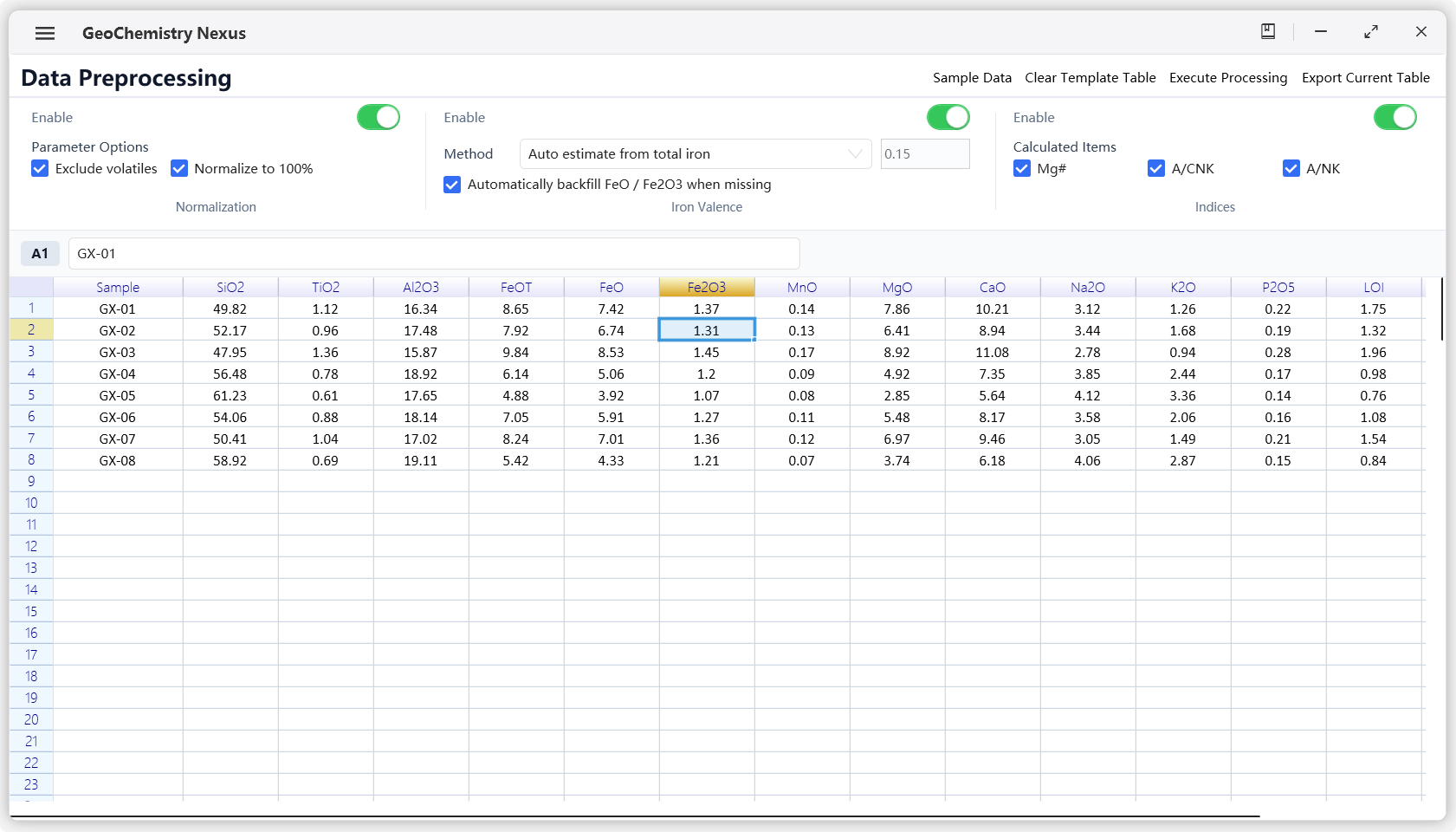
Module Features
This module mainly covers common geochemical preprocessing tasks:
- Import tabular data and recognize oxide columns
- Normalize major elements on an anhydrous basis
- Estimate iron valence distribution (FeO / Fe2O3)
- Calculate common geochemical indices (such as Mg#, A/CNK, A/NK)
- Export processed results for subsequent workflows
Recommended Workflow
-
Prepare data table
Recommended to include standard oxide headers, such asSiO2,TiO2,Al2O3,FeOT,FeO,Fe2O3,MgO,CaO,Na2O,K2O, etc. -
Load data
You can paste data directly into the table, or load sample data first to verify the workflow. -
Configure preprocessing options
Enable or disable modules as needed:- Anhydrous normalization
- Iron valence estimation method
- Geochemical index calculation
-
Run processing
Run preprocessing and review the output worksheet content. -
Export results
Export results as.csvfor subsequent analysis or plotting.
Key Parameter Descriptions
1) Anhydrous Normalization
When enabled, volatile components (such as LOI, H2O, CO2) are deducted and major oxides are rescaled to 100%.
Enable this option when you need cross-sample comparable major element analysis.
2) Iron Valence Estimation
When data only has total iron (FeOT), FeO and Fe2O3 distribution can be estimated according to strategy:
- Auto-estimate from total iron
- Back-calculate based on existing FeO / Fe2O3
- Correct using empirical ratio
Fe3+/Fe
Please choose the appropriate method based on data quality and research subject.
3) Geochemical Indices
The module supports calculating:
Mg#A/CNKA/NK
These indices are commonly used for magma evolution and aluminum saturation interpretation.
Input & Output
Input
- Worksheet containing sample IDs and oxide columns
- Recommended to use wt.% numeric format
Output
- Cleaned/normalized columns (depending on enabled modules)
- Iron valence estimation columns (when enabled)
- Geochemical index columns (when enabled)
- Processing summary information (for tracking parameters and results)
Usage Recommendations
- It is recommended to keep original data in a separate worksheet to avoid overwriting.
- Confirm column name conventions before processing to reduce field recognition errors.
- When used for papers or reports, it is recommended to clearly record the selected preprocessing parameters in the methods section.
If you would like to add new preprocessing strategies, please submit an issue or discussion in the project repository.